

Cookbook
Insurance claim triage
After a storm, claims arrive by the thousand, each one a photo and a few words from the customer's phone. This recipe decides each one in a single round trip: pay it now, send an adjuster, decline it, or investigate it. Wity answers four yes/no questions, the insurer's own rules make the call, and anything Wity is unsure about goes to a person.
- Level
- Intermediate
- Uses
- noul · images · generate
- Result
- 56 of 58 right, 0 wrong
- Model time
- ≈140 ms per claim
The approach#
Wity doesn't pick the outcome. It answers the judgment calls a claims handler makes when they look at a claim, each as a noul with a probability of yes:
| Question | Asks |
|---|---|
intact | Does the item in the photo look undamaged? |
matches | Does the photo show the damage the customer describes? |
covered | Does the policy cover that cause? |
major | Is it major damage, like a fire, a wrecked car or a home nobody can live in? |
Then ordinary code, the insurer's rules, turns the answers into one of four outcomes. Keeping the rules in code rather than in the prompt means a change of policy is a code change you can review and test, every decision can be traced to the answers behind it, and the confidence on each answer tells you exactly when to stop and ask a person.
| Outcome | When |
|---|---|
| Pay now | Covered, minor, and the photo backs up the story. Paid in the app, no person needed. |
| Adjuster | Covered and major. Book a visit. |
| Not covered | The policy excludes the cause. |
| Investigate | The photo shows no damage, or doesn't match the story. |
| To a person | Wity is unsure about an answer the decision rests on. |
The dataset#
29 claims across four policies: home, car with full cover, car with fire and theft only, and gadgets. Every claim has a real photo, 24 in all, from Wikimedia Commons (credits below), resized to 800 pixels with number plates blurred. The policies and stories are made up, and some are written to be awkward on purpose: the same hail photo is covered on one policy and not on another, and some stories describe damage the photo doesn't show. Each claim has the outcome a careful handler would choose, and the answers behind it.
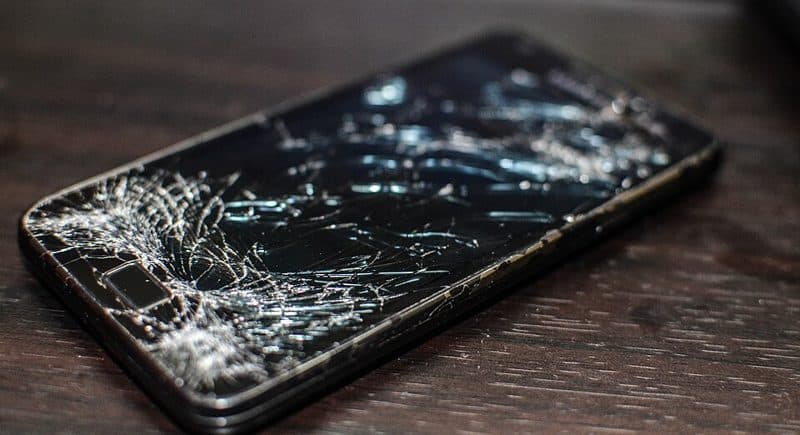
#1 · Gadget policy
“Dropped my phone on the pavement. The screen is cracked but it still turns on.”
→ Pay now
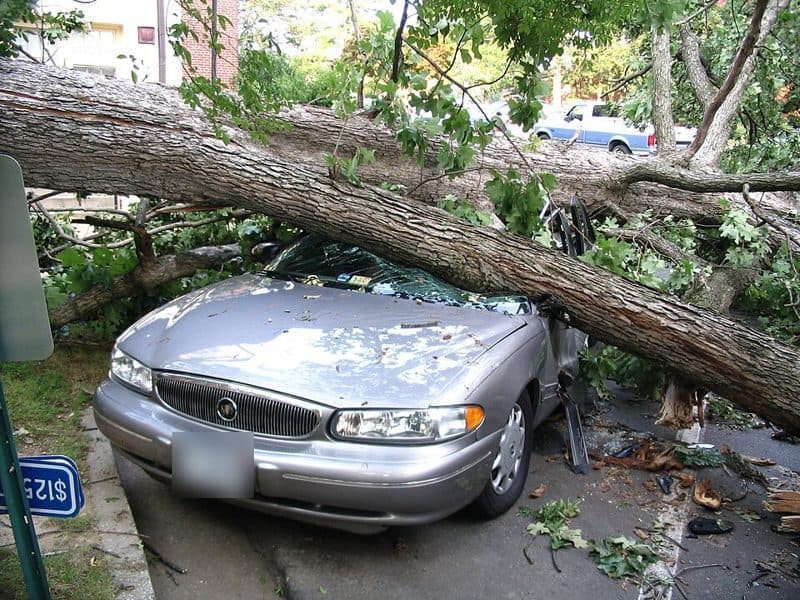
#13 · Car, full cover policy
“A tree fell on my parked car in the storm and crushed the windscreen and roof.”
→ Adjuster
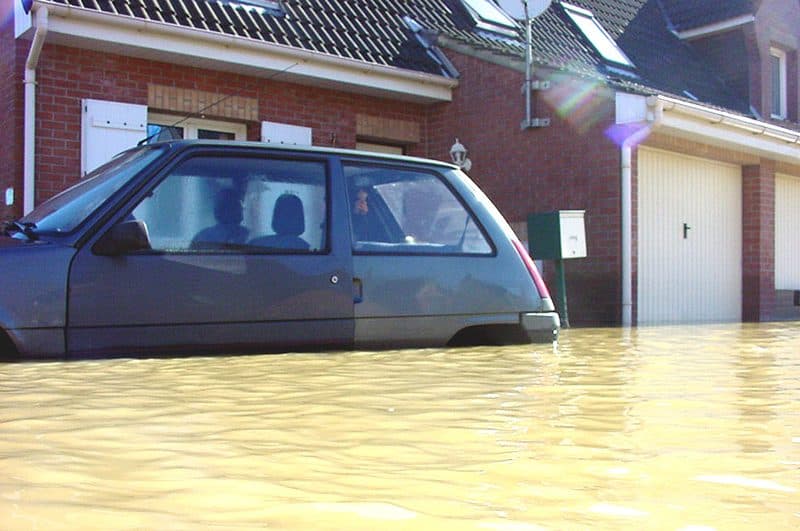
#18 · Car, full cover policy
“I drove into a flooded street and the water came up over the doors.”
→ Not covered
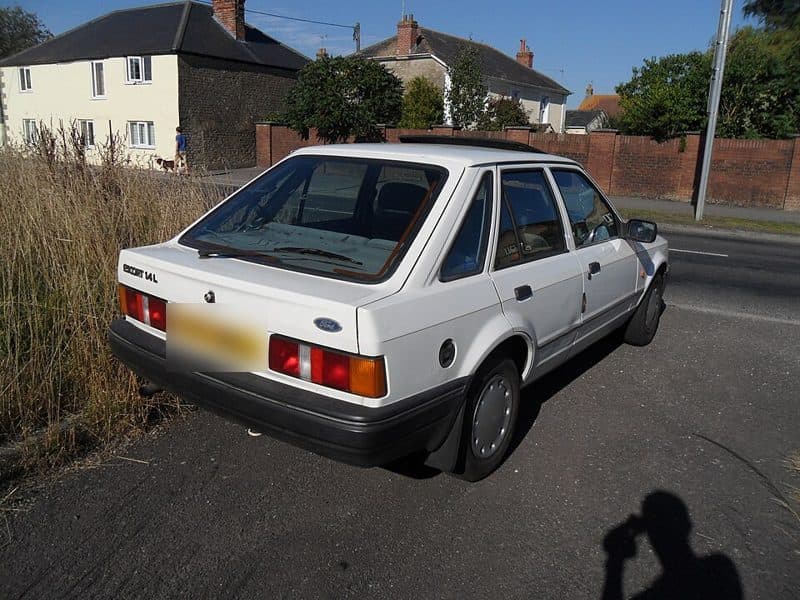
#28 · Car, full cover policy
“Someone crashed into my parked car and smashed the whole side in.”
→ Investigate
| Outcome | Claims |
|---|---|
| Pay now | 9 |
| Adjuster | 7 |
| Not covered | 6 |
| Investigate | 7 |
| Total | 29 |
Download claims.json. Each claim's photo sits next to it, at the path in its photo field.
Step 1: Put the policy and the story in the state#
The state is everything the handler would have in front of them: what kind of document this is, the policy's own words on what it covers and excludes, and the customer's story in quotes. The photo goes in image. reasoning is off: these are quick looks, not puzzles, and it keeps every claim to one fast pass.
{"state": "An insurance claim sent from the customer's phone app: one photo the customer took, and the customer's own words.\nThe customer's policy: Car insurance, full cover. Covers crashes, hail, fallen trees, fire, theft and broken glass. Does not cover driving into flood water.\nThe customer says: \"A tree fell on my parked car in the storm and crushed the windscreen and roof.\"","image": "data:image/jpeg;base64,/9j/4AAQSkZJRgABAQ...","reasoning": "off","questions": {"matches": { "type": "noul", "instructions": "Look at the damage you can actually see in the photo. Does the photo show the same item ..." },"covered": { "type": "noul", "instructions": "Going only by what the policy says it covers and does not cover, ..." },"major": { "type": "noul", "instructions": "Is the damage the customer describes major: a fire, a wrecked or crushed car, ..." }}}
Step 2: Ask about the photo on its own#
intact goes in a second request, sent at the same time, with only the photo and a one-line state. No policy, no story. A story about a crash is persuasive: with the story in the same request, Wity can be talked into seeing damage that isn't there. We asked intact both ways on the same claims:
| Photo | Story | Photo alone | With the story |
|---|---|---|---|
| An undamaged car | “Someone crashed into my parked car and smashed the whole side in.” | 0.61 | 0.01 |
| An undamaged laptop | “My laptop fell down the stairs and the screen is smashed.” | 1.00 | 0.50 |
| A car in flood water | “I drove into a flooded street and the water came up over the doors.” | 0.02 | 0.49 |
| An old, mossy roof | “Our roof has leaked a little for years.” | 0.01 | 0.44 |
The first row is the one that matters. On its own the photo scored 0.61, which is unsure, so the claim goes to a person. With the story it scored 0.01: a confident "damaged" for a car with nothing wrong with it, which the rules would then have paid. Across the 26 claims where the right answer is known, the photo alone got 23 right, 3 unsure and none wrong. With the story it got 21 right, 4 unsure and 1 wrong.
{"state": "A photo sent with an insurance claim.","image": "data:image/jpeg;base64,/9j/4AAQSkZJRgABAQ...","reasoning": "off","questions": {"intact": { "type": "noul", "instructions": "Look only at the photo. Does the main item in it look intact and in normal working condition, with no visible damage?" }}}
The two requests go out together, so a claim still takes one round trip. One image per request is the image limit anyway, and here it's the same photo twice.
Step 3: Word each question for every kind of loss#
Ask what you expect a healthy item to look like, not what a problem looks like. "Is there visible damage?" sounds like the same question as intact, and on photos of broken or clearly undamaged things it is. But it reads "damage" as breakage, and claims aren't all breakage:
| Photo | “Intact and in normal working condition?” | “Visible damage?” |
|---|---|---|
| A car in flood water | 0.02 (no: right) | 0.30 (no: wrong) |
| Houses in a river flood | 0.00 (no: right) | 0.55 (unsure) |
| An old, mossy roof | 0.01 (no: right) | 0.41 (unsure) |
The same goes for the other three questions. matches spells out what "doesn't match" means (a different item, a different cause, much worse or much milder) and says an undamaged item doesn't match. covered says to go only by the policy text. major gives examples on both sides of the line, so "a dented bumper" isn't left to taste. The full wording is in the code below. For more on this, see Writing good questions.
Step 4: Write the rules#
The rules run in order. First, does the photo back up the claim? A sure "intact" or a sure "doesn't match" is enough to investigate on its own. Then cover, then size. A yes or a no needs 0.7 or more. An answer between 0.3 and 0.7 sends the claim to a person, but only if the decision rests on it: an unsure major on a claim that isn't covered changes nothing, so it doesn't cost anyone's time.
SURE = 0.7 # a yes or a no needs 0.7 or more; anything in between goes to a persondef unsure(p):return 1 - SURE < p < SUREdef route(a):"""The insurer's rules. Returns the decision and the answers it rested on."""# 1. Does the photo back up the claim? A sure "intact" or a sure "doesn't match" is enough on its own.if a["intact"] >= SURE:return "investigate", ["intact"]if a["matches"] <= 1 - SURE:return "investigate", ["intact", "matches"]if unsure(a["intact"]) or unsure(a["matches"]):return "person", ["intact", "matches"]# 2. Does the policy cover the cause?used = ["intact", "matches", "covered"]if unsure(a["covered"]):return "person", usedif a["covered"] < 0.5:return "decline", used# 3. How big is it? Only asked of claims that got this far.used.append("major")if unsure(a["major"]):return "person", usedreturn ("adjuster" if a["major"] >= 0.5 else "pay"), used
Choosing 0.7
Step 5: Run it#
The whole recipe, end to end. It downloads the dataset, triages every claim and checks each decision against the answer key. Install the Python or TypeScript SDK and set WITY_API_KEY first.
import asyncio, base64, json, os, urllib.requestfrom wity import AsyncWityClient, noulBASE = "https://wity.alphanimble.com/cookbooks/claims/"def fetch(path):with urllib.request.urlopen(BASE + path) as r:return r.read()data = json.loads(fetch("claims.json"))photos = {p: "data:image/jpeg;base64," + base64.b64encode(fetch(p)).decode() for p in {c["photo"] for c in data["claims"]}}PHOTO_STATE = "A photo sent with an insurance claim."PHOTO_QUESTIONS = {"intact": noul("Look only at the photo. Does the main item in it look intact and in normal working condition, with no visible damage?"),}CLAIM_QUESTIONS = {"matches": noul("Look at the damage you can actually see in the photo. Does the photo show the same item with the same kind of damage the customer describes? Answer no if it shows a different item, a different cause or much worse or much milder damage, or if the item in the photo looks undamaged."),"covered": noul("Going only by what the policy says it covers and does not cover, is the cause of damage the customer describes covered?"),"major": noul("Is the damage the customer describes major: a fire, a wrecked or crushed car, a car that had to be towed, a roof broken open, or a home people can't live in? A cracked screen, a spill, small dents, a dented bumper, one broken window or a small leak are not major."),}def claim_state(claim):policy = data["policies"][claim["policy"]]["text"]return ("An insurance claim sent from the customer's phone app: one photo the customer took, and the customer's own words.\n"f"The customer's policy: {policy}\n"f'The customer says: "{claim["story"]}"')async def answer(client, claim):image = photos[claim["photo"]]# Two calls at once: the photo on its own, so the story can't sway it, and the whole claim.alone, whole = await asyncio.gather(client.system_one(state=PHOTO_STATE, image=image, questions=PHOTO_QUESTIONS, reasoning="off"),client.system_one(state=claim_state(claim), image=image, questions=CLAIM_QUESTIONS, reasoning="off"),)return {name: a.noul for res in (alone, whole) for name, a in res.nouls.items()}# route() from step 4 goes here.async def main():right = person = wrong = 0limit = asyncio.Semaphore(5) # 5 claims, so 10 requests, in flight at a timeasync with AsyncWityClient(api_key=os.environ.get("WITY_API_KEY")) as client:async def triage(claim):async with limit:return claim, await answer(client, claim)for claim, a in await asyncio.gather(*(triage(c) for c in data["claims"])):decision, _ = route(a)if decision == claim["route"]:right += 1elif decision == "person":person += 1else:wrong += 1print(f"#{claim['id']} {claim['photo']}: {decision}, want {claim['route']}", a)print(f"{len(data['claims'])} claims: {right} right, {person} to a person, {wrong} wrong")asyncio.run(main())
Results#
We ran every claim twice, 58 decisions in all, on 14 October 2026. Model time is the slower of each claim's two requests, as Wity reports it, so it leaves out the network.
| Outcome | Decisions | Right | To a person | Wrong |
|---|---|---|---|---|
| Pay now | 18 | 18 | 0 | 0 |
| Adjuster | 14 | 14 | 0 | 0 |
| Not covered | 12 | 12 | 0 | 0 |
| Investigate | 14 | 12 | 2 | 0 |
| Total | 58 | 56 | 2 | 0 |
- None wrong. No claim was paid, declined or sent out to an adjuster when it shouldn't have been.
- Two to a person, both the same claim: the undamaged car with a story about hail smashing the windscreen and denting every panel. Wity wasn't sure the car was intact (0.48 and 0.70, just under the line), which is the right claim to be unsure about.
- About 140 ms of model time per claim at the median, and $0.026 per thousand claims. The photo adds nothing to the bill: you're billed for the text, and images add no input tokens.
Results move a little from run to run on borderline photos. A run six days earlier on the same claims got 53 right, 5 to a person and, again, none wrong.
Step 6: Write the note for the file#
Every decision leaves a trail: the answers, their probabilities and the rule that fired. For the person who opens the file next, generate turns that into two plain sentences. Two details make it work:
- Text only. The answers already say what the photo shows. In our runs, generate took about 3 seconds with the photo attached and under half a second without.
- Findings without double negatives. An early version passed "undamaged: no", and the note read it the wrong way round. Plain sentences like "The photo shows damage" fixed it.
# The answers the decision rested on, as plain sentences: no double negatives.SAY = {"intact": ("The photo shows no visible damage", "The photo shows damage"),"matches": ("The photo matches the customer's story", "The photo does not match the customer's story"),"covered": ("The policy covers this cause", "The policy does not cover this cause"),"major": ("The damage is major", "The damage is minor"),}decision, used = route(a)findings = ". ".join(SAY[k][0 if a[k] >= 0.5 else 1] for k in used) + f". Decision: {decision}."# Text only: the answers already say what the photo shows, and it's much quicker without the image.note = await client.generate(state=claim_state(claim) + "\nWhat the desk found: " + findings,instructions="Write the note a claims handler leaves on this file for the next person: two short sentences at most, saying what happened, what the photo shows, and the decision and why. Plain words, no greeting.",shape={"type": "object", "properties": {"note": {"type": "string", "maxLength": 400}}, "required": ["note"]},max_tokens=140,)note.value["note"]
For claim #18, the car driven into flood water on a full-cover policy, the note read:
The customer drove into a flooded street and the water rose over the doors, causing damage shown in the photo.The claim is declined because driving into flood water is not covered.
Make it yours#
- Your policies. Paste your own wording into the state. The questions don't change when a policy does.
- More checks. Add nouls for the signals your handlers look for, like a photo that looks like a screenshot of another photo, or a story that doesn't fit the policy's dates. Each one is a rule in step 4.
- More photos per claim. One image per request, so ask about each photo in its own request, in parallel, and combine the answers in your rules.
- Test on your claims. Label a few hundred past claims and run them through Evaluate before setting thresholds.
Insurers who need claims data to stay in their own network can run Wity on their own hardware, with confidence calibrated to their claims. See Enterprise.
Photo credits#
Real photos from Wikimedia Commons, resized to 800 pixels, with number plates blurred on four of them. The claim stories are made up and are not what happened in these photos.
- phone_cracked.jpg: Samsung Galaxy S2 shattered screen.jpg by Ashwin Kumar from Bangalore, India, CC BY-SA 2.0
- phone_ok.jpg: Blackview A60 Smartphone Android mobile phone front face logged in screen.jpg by Acabashi, CC BY-SA 4.0
- laptop_cracked.jpg: 2006 broken laptop computer 237398638.jpg by Bruce Turner from AustinTX, CC BY 2.0
- laptop_ok.jpg: IBM Thinkpad R51.jpg by André Karwath aka Aka, CC BY-SA 4.0
- car_hail_dents.jpg: Some cars are not designed to survive a summer in Queensland due to hail.jpg by Chris Olszewski, CC BY-SA 4.0
- car_hail_glass.jpg: Hailstone-smashed front windshield of a car from 4 July 2010 hailstorm (Limon, eastern Colorado, USA).jpg by James St. John, CC BY 2.0
- car_bumper.jpg: The end for the Laguna. (14160350996).jpg by Riley from Christchurch, New Zealand, CC BY 2.0
- car_crash.jpg: Toyota car accident Japan.jpg by Snake Head 1995, CC BY-SA 3.0
- car_wreck.jpg: The front of a car shows major damage.jpg by Shixart1985, CC BY 2.0
- car_tree.jpg: Barcroft 1100 Thomas St Car Damaged by Tree (7536694422).jpg by Arlington County, CC BY-SA 2.0
- car_tree_b.jpg: Car crushed by tree (9723428451).jpg by Ben Schumin from Montgomery Village, Maryland, USA, CC BY-SA 2.0
- car_fire.jpg: Burnt-out car - geograph.org.uk - 5226168.jpg by Dave Pickersgill, CC BY-SA 2.0
- car_flood.jpg: Car in waterFlood 02 03 02.jpg by Lamiot, CC BY 3.0
- car_ok.jpg: Late 1991 Ford Escort mk4 1.4 L (9672436255).jpg by Charlie from United Kingdom, CC BY 2.0
- car_window.jpg: Smashed window (17074306875).jpg by Tony Webster from Portland, Oregon, United States, CC BY 2.0
- house_fire.jpg: Aftermath of a House fire on East Park Road, Spofforth, North Yorkshire (30th August 2025) 003.jpg by Mtaylor848, CC BY-SA 4.0
- house_tree.jpg: Felled tree and damaged house, Holywood - geograph.org.uk - 3839993.jpg by Albert Bridge, CC BY-SA 2.0
- house_flood.jpg: Flooded houses, Chertsey (geograph 3812479).jpg by Alan Hunt, CC BY-SA 2.0
- sink_leak.jpg: Leaking PVC Pipe Under Sink - P Trap (52842956605).jpg by Tony Webster, CC BY 2.0
- ceiling_leak.jpg: Ceiling water damage.jpg by Atomicdragon136, CC BY 3.0
- roof_old.jpg: Moss on the roof - geograph.org.uk - 1062007.jpg by Dave Croker, CC BY-SA 2.0
- roof_hole.jpg: Leaking Roof - geograph.org.uk - 2515793.jpg by Andy Beecroft, CC BY-SA 2.0
- window_house.jpg: Broken window.jpg by Votpuske, CC0
- bike.jpg: Bicycle parked at the Lower Agoda Fort.jpg by iMahesh, CC BY-SA 4.0